Matthew McDermott’s Blog

Link to Post

Microsoft’s Office Sustained Engineering blog has announced the release date of Office SP2 including the Office servers. From my perspective I see the importance of the following ECM improvements:

Enterprise Content Management (ECM)

  • The performance and stability of content deployment and variations feature has been improved.
  • A new tool has been added to the STSADM command-line utility that enables a SharePoint administrator to scan sites that use the variations feature for errors.
Read More →

Link to Post

Join us for the March 11th meeting of the Central Texas SharePoint User Group!

Stump the Panel!

March Program Description:

This month we’re going “Back to Basics” with a Stump the Panel Session. SharePoint experts Matt McDermott, Brad Freels, Coan Dillahunty, Bruce Weatherford, and Janet Taylor will be answering your toughest questions!

We will be giving out $10 Starbucks gift cards to the first 10 people who ask questions and if you actually stump the panel, you will be rewarded with a $25 Barnes and Nobles gift card! So, bring your toughest questions and get ready to stump our experts.

Read More →

Link to Post

Ever since moving to Vista and Office 2007 and MOSS everyone I know with this same configuration has complained about the constant prompting in Office 2007. Here is the scenario and the fix as detailed by one of our AWSOME Desktop Support Engineers at Catapult, Greg (Awesome-O) Tate:

What’s the difference?

I found a fix for the annoying Vista prompts in SharePoint, and both work well on domain computers connected internally and externally. We are still getting many help desk requests for credential prompts when accessing Office files stored in a SharePoint document library. There are many blog posts on this topic, but the root of the problem boils down to an improvement in the security design in the way Vista uses its newly-revamped WebDAV protocol (which is a set of extensions to HTTP that allows you to work with files on a server through the Internet). See references below for more information.

Read More →

Link to Post

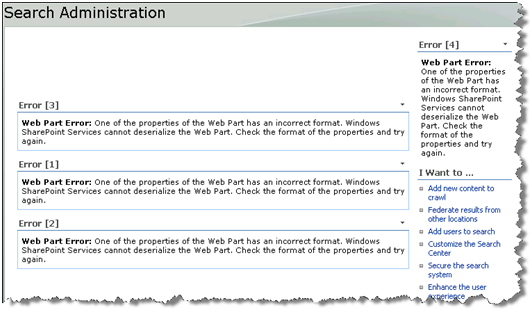
What do you do when you open your Search Administration site and it looks like this?

Search Administration Errors

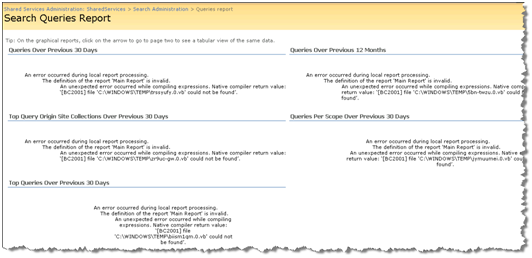
Or you open your Search Queries Report (SpUsageSSPSearchQueries.aspx) looks like this:

Search Query Report Errors

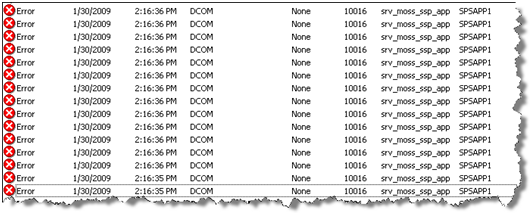
Or every time you open the Search Query Report you see the following in your Event Logs:

DCOM Errors!

Error Details

Event Type: Error

Event Source: DCOM

Event Category: None

Event ID: 10016

Date: 1/30/2009

Time: 2:16:35 PM

Read More →

Link to Post

Paul Andrew has just announced that the SharePoint Disposable Object checking tool SPDisposeCheck has been released into the wild. Jump over to: http://blogs.msdn.com/pandrew/archive/2009/01/29/spdisposecheck-v1-3-1-is-released.aspx and have a read.

If you are a developer and don’t know about the issues related to disposable objects in SharePoint then have a read of Roger Lamb’s blog post on the topic.

Cheers!

Read More →

Link to Post

I recently helped a client with a crawl configuration that turned out to be a bit trickier than I expected. The client has a page that generates “hidden” links to a library of PDF documents. The URL to this page was simple enough: http://www.docs.company.com. This page had several links on it that categorized the folders and files to facilitate the crawl process. For example:

http://www.docs.company.com/documents/public/documents/resources/getdocs.foo?Division=Monterey%20Coast

This page renders another page with links to the actual documents with URLs like:

Read More →

Link to Post

I am happy to say that I have been renewed as a Microsoft Office SharePoint Server MVP for another year! Each year begins with looking at my e-mail for the renewal notification. I am pleased and honored to be considered in this great group of talented folks. Thanks Microsoft!

Read More →

Link to Post

For all the bashing we give SharePoint Designer, there are some very cool, though poorly documented, features. For example, have you ever found yourself creating a style sheet from a graphic provided by a designer? Did the designer give you every hex color value? Would you like to be able to select the exact color and be self sufficient? Here is how I use SharePoint Designer to solve the problem.

Read More →

Link to Post

I am often asked by Human Resource folks about “obscene content” in a SharePoint environment. However the content gets in, they don’t want it to be found. There are utilities like Forefront that will perform content filtering for SharePoint, but most fall short of filtering “everything”. For example, Forefront only filters documents, not list items, publishing pages, content editor web parts, or profile properties.

I got to thinking about this issue while listening to a recent interview with Rob Bogue on the SharePoint Pod Show. In his governance interview he was talking about configuring search in such a way that the act of searching for profanity returns a link to the Employee Code of Conduct.

Read More →

Thank You for your interest!


AbleBlue is no longer taking new customers.